

Supercharge your fitness and get results with our cutting-edge health and fitness tracker.

Elevate your fitness journey with the FXC Fitness Tracker Google Spreadsheet. Effortlessly track and organize your workouts, goals, macros and more! Visualize an overview of your fitness and nutrition plans with our intuitive platform, which provides comprehensive insights and seamless tracking – allowing you to achieve your goals and obtain the results you are striving for.
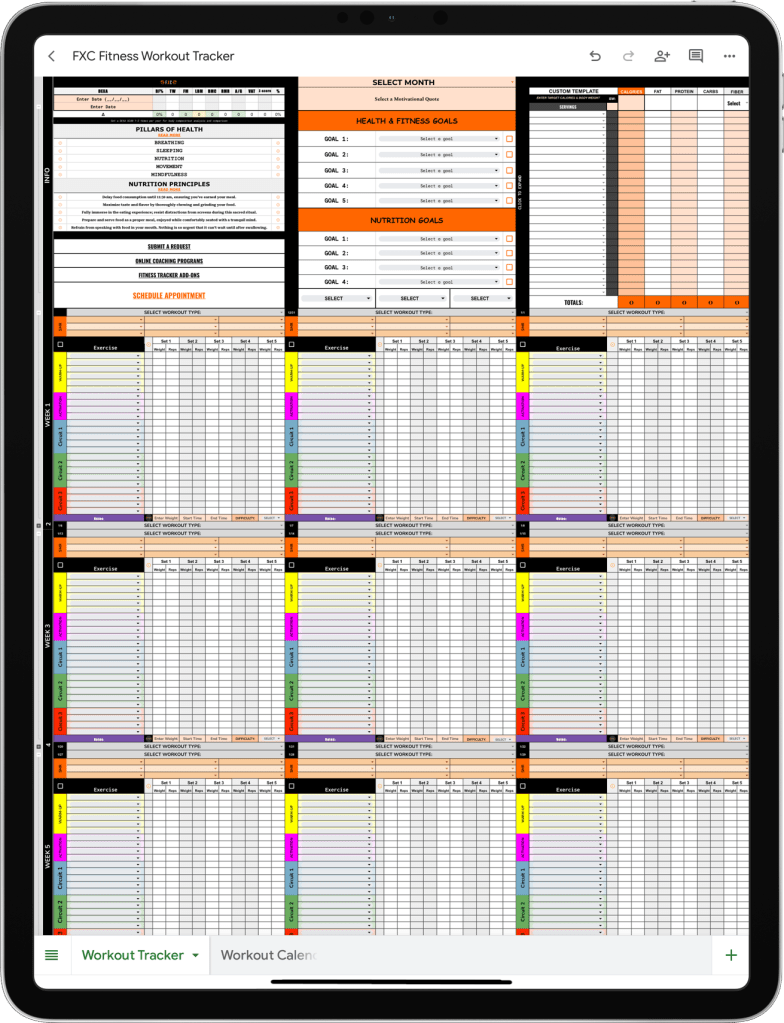

FXC Fitness Tracker Google Spreadsheet
$4.99
Features
- Intuitive User Interface
- Effortlessly navigate through a thoughtfully designed layout
- Expandable and collapsible sections for a seamless user experience
- Extensive Exercise Database
- Access a diverse list of 750+ exercises and variations
- Ability to add new exercises to our dynamic Exercise List by submitting a request in the F.A.Q below
- Customizable Workout Logs
- Choose from over 125 workout types for personalized logging
- Record sets, reps, weights and notes seamlessly for each workout session
- Dropdown menus to easily select exercises from the extensive exercise database
- Comprehensive Workout Calendar
- Efficiently plan and track workouts with a user-friendly calendar view
- Easily schedule and modify your workout sessions
- Can be reused forever by creating duplicates for each year (see F.A.Q. for instructions)
- Goal Tracking
- Set, monitor and achieve health, fitness and nutrition goals
- Clearly track and monitor progress towards specific targets
- Body Composition Tracking
- Log data from current and past DEXA scans to monitor progress
- Built-In and Customized Macro Tracking
- Record and monitor daily macronutrient intake
- Track calories, protein, fats and carbohydrates
- Macro and Calorie Recommendations
- Custom recommendations based on fitness and body composition goals
- Input body weight and total calories for optimal macronutrient intake
FXC Fitness Tracker Add-Ons
Upgrade your experience with personalized add-ons and learn how to get the most out of the FXC Fitness Tracker Google Spreadsheet!
Delivery
Upon completing your purchase, please ensure to provide a valid Google email address during the transaction. Here’s what you can expect:
For Spreadsheet Only Purchases:
After the transaction is confirmed, please allow at least 12 business hours for the fitness tracker spreadsheet to be shared with the provided email address.
For Add-On Purchases:
If you’ve purchased an additional package, you will receive an email within 12 hours containing a fitness questionnaire. Complete the questionnaire to personalize your experience. Your personalized workouts and/or calendar will be delivered via email within 2 business days.
For Virtual Consultations:
If you’ve purchased a consultation, be on the look out for email regarding scheduling preferences. Alternatively, you can conveniently book an appointment directly by visiting the ‘Appointments’ tab on the website.
We appreciate your patience and look forward to supporting you on your fitness journey!
Terms & Conditions
We are dedicated to delivering top-notch products and services. Should you encounter any challenges with your purchase, please reach out to us at fxcfitness@gmail.com. We will make every effort to address the issue to your satisfaction. Please note that, unfortunately, we are unable to provide refunds for any reason.
By purchasing the FXC Fitness Tracker Google Spreadsheet, you agree to the following terms and conditions:
- Ownership and License: The Google Spreadsheet you have purchased is the property of Funxtional Creations LLC and is protected by copyright laws. You are granted a non-exclusive, non-transferable license to use the Google Spreadsheet for personal or business use only.
- Restrictions: You may not reproduce, distribute, modify, or create derivative works based on the Google Spreadsheet without the express written permission of Funxtional Creations LLC. You may not resell or redistribute the Google Spreadsheet in any form without the express written permission of Funxtional Creations LLC.
- Compliance: You agree to use the Google Spreadsheet only in accordance with applicable laws and regulations.
- Termination: Funxtional Creations LLC reserves the right to terminate this license at any time if you breach any of these terms and conditions.
F.A.Q.
How can I submit a request to include an exercise, goal, or food item in the fitness tracker database?
Utilize the form below to request the addition of specific inputs.


I do not know what exercises to select when trying to create a workout. How should I get started?
Your workout is split into 6 distinct phases:
SMR – Warm Up – Activation – Circuit 1 – Circuit 2 – Circuit 3
SMR: Select the muscle groups that you will be using during the selected workout type. For example, if you are doing a Lower Body Squat workout, it makes sense to foam roll your hips, quads, adductors (inner thighs) and calves during this phase.
Warm-Up: Choose movements that prep the muscles you plan on using during your workout. For example, if you are doing an Upper Body workout, you should warm up your chest, back, shoulders and arms.
Activation: Following the warm-up, focus on exercises that activate specific muscles related to your workout. For instance, if your workout involves hip bridge exercises, activate your hips, glutes and hamstrings.
Circuit 1, Circuit 2, Circuit 3: These are the main components of your workout routine. For each circuit, select exercises that align with your fitness goals and target various muscle groups. Refer to the extensive exercise database for a wide range of options.
The FXC Fitness Tracker is designed to effortlessly guide you through the process of program design. If you’re unsure about specific exercises, YouTube is an excellent resource to find demonstrations. Feel free to explore and experiment with exercises that match your fitness level and preferences. As you become more familiar with the tracker, you will find it easier to tailor your workouts to suit your individual needs.
What types of workouts does the spreadsheet support?
The spreadsheet is versatile and can accommodate various workout types, including cardio, strength training, yoga and more. Customize it to fit your fitness routine.
How do I input my workout data into the spreadsheet?
Simply navigate to the designated columns and rows for workouts and enter your data, including exercise type, duration, quantity, difficulty and any additional details.
How can I consolidate my monthly workouts onto a single sheet without creating a new tab for each month?
Make a duplicate the ‘Workout Tracker’ sheet and type ‘Q’ in Cell P1. Select the current quarter from the dropdown menu.
Note: Using a quarterly sheet requires the workout dates to be updated manually as it affects the auto-population feature.
Can I customize the spreadsheet to fit my specific fitness goals?
Absolutely! The spreadsheet is designed to be customizable. Feel free to adjust columns, add categories or modify as needed to align with your fitness objectives.
How do I create a calendar for a new year?
Make a duplicate the ‘Workout Calendar’ sheet by right-clicking the tab and selecting ‘Duplicate.’ Open the duplicated tab and choose the current year from the dropdown menu in Cell A1.
Is the FXC Fitness Tracker compatible with all devices?
Yes, the spreadsheet is compatible with most devices that support Google Sheets – including desktops, laptops, tablets and smartphones.
Can I use the spreadsheet offline?
Google Sheets primarily operates online. However, you can enable offline mode and access the spreadsheet with limited functionality. Ensure your changes sync once you’re back online.
 fxcfitness.com